RuneScape · Interface and questing
RS3 Plugin Hub: how to install and enable plugins
To enable RuneScape 3 plugins on desktop, open the toolbox icon on the Ribbon, complete email verification and install the tool you want. If it stays off, open Manage, select the padlock, review its permissions and enable it. This guide shows the actual interface, common troubleshooting steps and the status of later releases.
How to access the RS3 Plugin Hub
Open the toolbox icon on the in-game Ribbon, usually near the bottom-right of the screen. You install and manage RS3 plugins inside RuneScape.
- Classic interface: look for the toolbox directly on the Ribbon.
- Default modern Ribbon: hover over Settings to find the toolbox.
- Custom Ribbon: check its end. If there was no room for the icon, edit the Ribbon and add it.
These interface paths come from Jagex's access instructions. This guide concerns RuneScape 3; the RuneLite Plugin Hub belongs to Old School RuneScape.
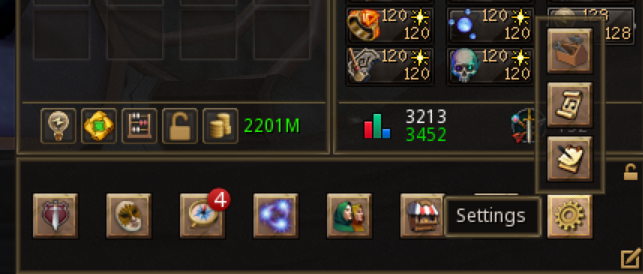
How to enable plugins in RS3
- Open the RS Plugin Hub using the toolbox and choose a plugin to install.
- Verify an email address for mod.io, the hosting platform used by the Hub. Jagex recommends the email linked to your Jagex Account, although another address can be used.
- Install the plugin. According to the live-release instructions, it should normally enable automatically after installation.
- If it stays inactive, open Manage. Select the padlock, review the required permissions and accept them if you want to use the plugin. Then enable it in that tab.
The same Hub lets you manage and uninstall tools. Installed and enabled are separate states: completing installation alone may leave a plugin inactive when permission approval is still required.
Our suggested first test: try one tool on a familiar activity, then check its settings before adding another. This makes it easier to identify which plugin changed an overlay or interaction.
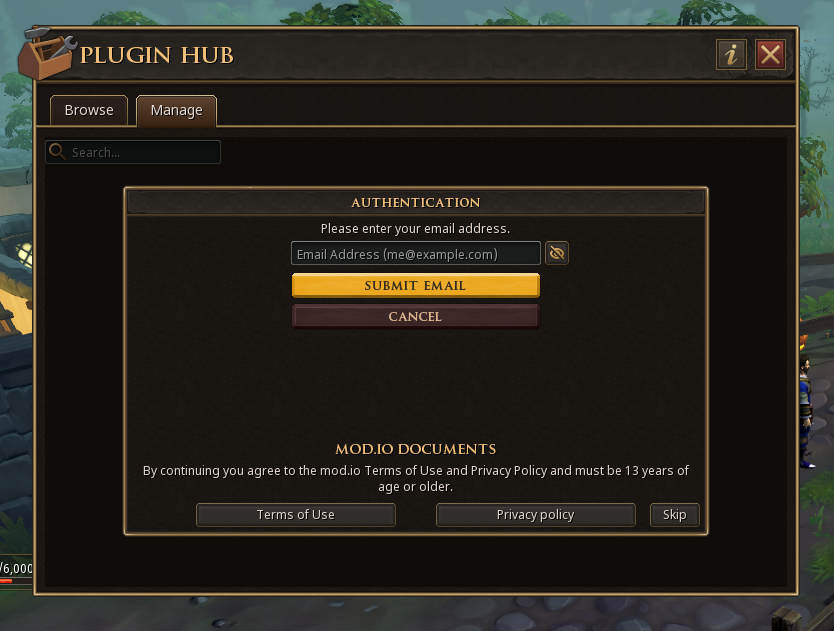
RS3 Plugin Hub missing or plugins not working?
- No toolbox: check Settings or your custom Ribbon editor.
- Installed but switched off: select the padlock in Manage and check pending permissions.
- A new plugin is missing from Browse: enter its full name in the Hub search field. Jagex described this caching issue in the 5 November batch 2 release notes.
- Email verification fails: check that you completed the mod.io step and look in your spam folder. The 26 October FAQ identifies a problem with some addresses containing a “+” sign and recommends another address if you encounter it.
- You load a test world: return to the normal client; on Steam, check whether an old beta launch option remains set.
Does the game close after you start plugins?
Jagex's 9 November update acknowledges rare plugin-related crashes and describes a reinstall workaround. If this matches your problem, follow the procedure in that official notice. An engine fix was planned for December; this does not establish that every plugin error has the same cause.
When reporting a problem, include your client, plugin name, the action that triggers it and the exact message. Choose the reporting channel according to whether the problem concerns the Hub or an individual plugin.
New plugins: Ground Items, Drop Log and the next batch
Jagex released 13 more plugins on 5 November, including Ground Items, Drop Log and Farming Timer, alongside technical dependencies. Ground Items is available; its earlier pending-review status concerned the October launch. See all 13 new plugins and what they do.
In its 9 November update, Jagex scheduled the next batch for 19 November 2026. The team hopes to include Clue Trainer, subject to review and testing. Its inclusion was not confirmed when this guide was checked.
Are RS3 plugins available on Android and iOS?
Jagex plans mobile plugin support, but its official 26 October FAQ gives no date. The announcements checked on 14 November do not announce a mobile release. The instructions and screenshots above show the desktop client; a missing toolbox on a phone alone does not establish an installation fault.

RS3 plugins release date: when did the Plugin Hub launch?
RuneScape 3 plugins launched on 19 October 2026. The official Jagex release announcement confirms that the RS Plugin Hub is available in the live game. The earlier public beta began on 6 October 2026 on separate test worlds.
For normal play, follow the live-client installation instructions above. The beta's world-204 links and special Steam launch options belong to that earlier test. New plugins have their own release schedules; the Hub launch date does not mean that every planned plugin is available.
How to start Quest Helper
The official plugin breakdown explains that supported quests have an asterisk in the Quest panel. Right-click one of these to use Quest Helper. Its purpose is to follow your quest progress and direct you towards the next step. The launch count of 69 is a coverage snapshot, not a promise to support every quest.
For a returning player, a sensible test is a quest you want to complete rather than one chosen only because a helper exists. Read the dialogue if the story matters to you; assistance with finding the next objective need not turn the whole adventure into a checklist. If guidance appears inconsistent, compare it with the quest journal before spending time repeating a route.
The distinction from the beta matters here. The October test used separate worlds whose progress did not carry over. Do not follow old beta-world launch instructions when your aim is to use the released Hub in your normal game.
What do the other four launch plugins do?
- Menu Entry Swapper reorders interaction-menu options. Use it to adjust permitted repeated interactions.
- Tilemarkers records manually chosen locations. Hold Ctrl + Shift and right-click a tile to mark it; repeat on a marked tile to customise it.
- Entity Hider hides selected kinds of characters or creatures from view.
- Job Gauges brings combat resources and cooldown information into combat-style overlays.
Our practical approach: choose according to the problem. If you forget a position you have already learned, a manual marker gives it a visible reminder. If your screen is crowded, try hiding one category before making broader changes. With combat overlays, keep the information you actually act on easy to locate rather than filling every available space.
Why RuneScape plugins do not work exactly like RuneLite
The API controls what each tool can access. At launch, Menu Entry Swapper cannot make Teleport or Drop the default left-click action for items, or provide Buy All in shops. An unavailable option therefore need not mean that you installed it incorrectly.
The official plugin guidelines allow clarity and organisation tools but prohibit automated player actions and replacing player skill or decision-making. Manually marking a tile and automatically predicting a safe position are different capabilities. A helper is not permission to use a bot.
The five-plugin October list describes the Hub launch. Ground Items arrived on 5 November; see the current releases section for Clue Trainer and the next batch.
Where to report a plugin problem
Check the plugin's mod.io page, linked from the Hub, for its developer's preferred feedback channel. For the Hub itself, use the game's bug-reporting option or the official RS Plugin Discord. Describe the action, the expected result and what happened; include which plugin was enabled so that another person can reproduce it.
Community creators maintain the tools, while Jagex reviews submissions. The submission documentation also requires descriptions of requested permissions and data use. Reading those explanations is useful when deciding whether a tool fits your needs. A larger catalogue is less valuable than a few tools you understand and can turn off when you no longer need them.
If you are interested in making a plugin, start with Jagex's API documentation and Lua tutorial. For more developments in the game, see our RuneScape 2027 roadmap overview.
Official sources and verification
- Jagex — RuneScape Plugins Officially Available Now!, 19 October 2026: release, access, launch list and current restrictions.
- Jagex — API Plugin Hub beta and plugin breakdown, 6 October 2026: individual tools and quest access. The separate beta instructions are historical.
- RuneScape Client API — Plugin guidelines.
- RuneScape Client API — Submission process.
- RuneScape Client API — Getting started.
- Jagex — plugin FAQ, 26 October 2026: email verification, mobile and support.
- Jagex — plugin batch 2, 5 November 2026: 13 additions, permissions and search.
- Jagex — weekly update, API section, 9 November 2026: the next batch, Clue Trainer and crash information.
Sources checked on . The five-plugin list and 69-quest count describe the 19 October launch; consult the in-game catalogue for later additions. Suggested ways to try the tools are our editorial advice; this is not a hands-on performance review.